단축 주소
-
word.py
import requests
from bs4 import BeautifulSoup

# ✅ 워드프레스 게시물 주소
url = "https://qer.kr/?p=1031"
res = requests.get(url)
soup = BeautifulSoup(res.text, "html.parser")

# ✅ 게시물 제목 추출
title_tag = soup.select_one("h1.entry-title, h1.post-title")
page_title = title_tag.get_text(strip=True) if title_tag else "용산초 바로가기 & 메모"

# ✅ 본문 추출
post_div = soup.select_one("div.post-content, div.entry-content")
lines = []

if post_div:
    for br in post_div.find_all("br"):
        br.replace_with("\n")
    raw_text = post_div.get_text()
    split_lines = raw_text.split("\n")
    for line in split_lines:
        line = line.strip()
        if line:
            lines.append(line)

# ✅ 항목 분리 및 순서 저장
items = []
for line in lines:
    if line.startswith("@링크:") and "|" in line:
        content = line.split("@링크:", 1)[1]
        title, link = [x.strip() for x in content.split("|", 1)]
        items.append(("link", title, link))
    elif line.startswith("@메모:") and "|" in line:
        content = line.split("@메모:", 1)[1]
        title, note = [x.strip() for x in content.split("|", 1)]
        items.append(("memo", title, note))
    elif line.strip() == "@급식":
        items.append(("lunch",))

# ✅ HTML 생성
html = f"""<!DOCTYPE html>
<html lang="ko">
<head>
  <meta charset="UTF-8">
  <title>{page_title}</title>
  <style>
    body {{
      font-family: 'Noto Sans KR', sans-serif;
      margin: 0;
      padding: 0;
      background-color: #f8f8f8;
      color: #333;
    }}
    .container {{
      max-width: 480px;
      margin: 0 auto;
      padding: 20px;
    }}
    h1 {{
      font-size: 22px;
      text-align: center;
      margin-bottom: 30px;
      color: #333;
    }}
    .item {{
      margin-bottom: 14px;
    }}
    .link-button {{
      display: block;
      padding: 14px;
      text-align: center;
      background-color: #222;
      color: #fff;
      text-decoration: none;
      border-radius: 8px;
      font-size: 16px;
      transition: background-color 0.2s;
    }}
    .link-button:hover {{
      background-color: #444;
    }}
    .memo-box {{
      background: #fff;
      border-left: 4px solid #007acc;
      padding: 12px 16px;
      border-radius: 6px;
      box-shadow: 0 1px 4px rgba(0,0,0,0.05);
      font-size: 14px;
      line-height: 1.5;
      word-break: keep-all;
      white-space: normal;
    }}
    .memo-title {{
      font-weight: bold;
      margin-bottom: 4px;
    }}
    iframe {{
      width: 100%;
      height: 250px;
      border: none;
      border-radius: 8px;
      box-shadow: 0 1px 4px rgba(0,0,0,0.1);
    }}
  </style>
</head>
<body>
  <div class="container">
    <h1>📌 {page_title}</h1>
"""

for item in items:
    if item[0] == "link":
        _, title, link = item
        html += f'<div class="item"><a class="link-button" href="{link}" target="_blank">{title}</a></div>\n'
    elif item[0] == "memo":
        _, title, note = item
        html += f'<div class="item"><div class="memo-box"><div class="memo-title">{title}</div>{note}</div></div>\n'
    elif item[0] == "lunch":
        html += '<div class="item"><iframe src="https://qer.kr/lunch.html"></iframe></div>\n'

html += """
  </div>
</body>
</html>
"""

# ✅ 저장 경로
with open("/var/www/html/yong/index.html", "w", encoding="utf-8") as f:
    f.write(html)

print("✅ index.html 생성 완료 → /var/www/html/yong/index.html")
@급식 으로 급식 추가
크론탭
35 8 * * 1-5 /usr/bin/python3 /var/www/html/yong/word.py
추가
-
마인크
-
마인크래프트 에듀케이션
설문 추가
2025 교실 속 게임리터러시 상반기 참여학급 선생님들을 대상으로 게임리터러시 교육 효과성 검증 검사를 안내드립니다.
참고로 ‘게임리터러시 교육 효과성 검증 검사’는 5월 14일 이후부터 교육을 시작하시는 참여학급 선생님들께서 필수로 진행해주셔야 하는 검사이며, 정확한 검사 진행을 위해 교육 효과성 검사 관련 교사연수 영상&자료를 확인하시어 내용을 숙지 후 효과성 검증 검사에 참여 부탁드립니다. 🙂1. 사전 검사 연수 녹화본 및 자료
5월 14일 (수)에 진행된 연수 녹화본과 자료를 공유드립니다.
원활한 검사 진행을 위해 사전 검사 실시 전 연수 영상 확인을 부탁드립니다.
– 연수 녹화본: https://drive.google.com/file/d/102tD39pNmof3AMwyRVDJxeZghIDEdSX8/view?usp=sharing
– 연수 자료: https://drive.google.com/file/d/1HLE4khS5AmAUWsuJ7MtVQs0WBABfbA-i/view?usp=sharing2. 사전 검사 안내1) ★게임활용 코딩 교육 검사 URL(사전검사)
– 사전 검사 사이트: https://m.site.naver.com/1HsKj / QR코드 첨부파일 확인
– 비밀번호: 17902) 검사 참여 대상
– 2025 교실 속 게임 리터러시 사업 참여학급: 5/14 이후 교육 시작하는 학급만 사전-사후 검사 참여
– 헬로메이플 선도연구회: 사전-사후 검사 필수 참여
*특수학급 => 검사 대상 제외3. ★사전검사 문항 관련 안내사항1) ★개인정보(학교, 학년, 반, 이름)을 정확하게 입력합니다!
2) ★검사지 이름(사전 / 사후검사)을 잘 확인하고 시작합니다!
3) 설문문항(1~27번 문제)은 5분 내외로 풀고 다음 쪽의 문제를 푸는 것을 권장합니다.
4) 설문문항(1~27번 문제)을 학생들이 잘 이해하지 못하는 경우, 선생님들의 충분한 설명을 부탁드립니다!
5) 28~37번 문제는 문제풀이 형식으로 학생들이 스스로 해결할 수 있도록 해주세요.
6) ★제한시간을 최대한 끝까지 사용하여 문제를 풀고, 제출 전 검토할 수 있도록 해주세요!!
7) 문제를 다 풀기 전에 제한 시간이 끝나는 경우, 마지막으로 푼 문제까지 자동으로 제출됩니다.
8) 검사는 1회만 참여하며, 정규 수업 시간 내에 실시해주세요.(가정에서 과제로 참여X)연수물
https://drive.google.com/file/d/1HLE4khS5AmAUWsuJ7MtVQs0WBABfbA-i/view
<링크> 1. 일반학급 설문조사
① 사전
– 교사
https://docs.google.com/forms/d/e/1FAIpQLSf2C7PdcF_kEetMZ-N-_D-oT7HXg1RtU_7-sBKaJwZKo6sFyw/viewform?usp=header
– 학생
https://docs.google.com/forms/d/e/1FAIpQLSfB_ReuKwt7OJIgme_SpG53b6a-iKHR2VGXlcx9oB1BZSj7Dg/viewform?usp=header② 사후
– 교사
https://docs.google.com/forms/d/e/1FAIpQLSeJrY4WhfM912MxSXKYHG70v7MH4gmr8hnN-UjUEUH_-RtVxQ/viewform?usp=header
– 학생
https://docs.google.com/forms/d/e/1FAIpQLSeu5hCRqCpubUOleMuqHnQfZ3AnMTJJox-j-m5r5y7BykDy8A/viewform?usp=header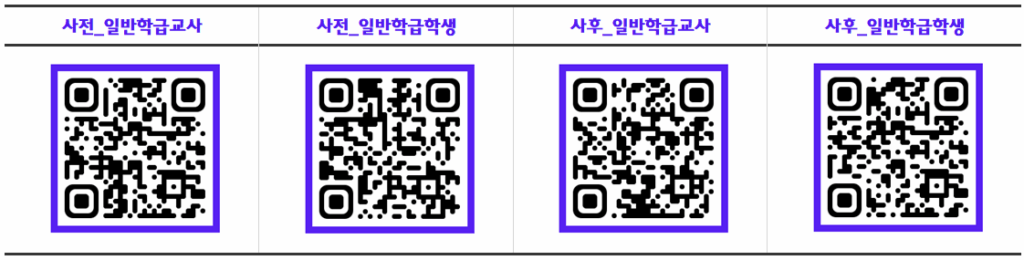
자료 목록
https://drive.google.com/drive/folders/11AEdoSbT4nTZY_dTKUUMxibCRVGvv4Vv?usp=sharing
- 강사 이력 카드
- 게임활용 코딩 결과 보고서
- 운영계획
- 교사용 지도안
- 학생용 교재
결과보고서 제출방법
수업 진행 후 작성해주셔야 하는 보고서입니다.
1. 드라이브 링크에서 보고서 양식을 다운로드
https://drive.google.com/file/d/1FmDBR0M7R35EnMlxU8iuvZWRAW68Ps70/view?usp=drive_link2. 결과 보고서 작성(4차시 中 2차시만 작성/ 수업 결과1, 2)
3. ‘안내 보기’ -> 오른쪽 상단 ‘+ 추가 또는 생성’ 클릭 -> ‘파일’ 클릭 -> ‘업로드’ 클릭 -> 결과 보고서 업로드 -> 제출
*서류 제출 기한 : (수업 종료 후 일주일 이내) ~7월 11일
-
알짜노트넷
알짜노트넷
-
3D 프린팅 자료
-
과학 자료
-
용산초 4학년
-
QER.KR
단축 주소용